Chapter 04 Variables & Data Types
#037 Switch on Enum
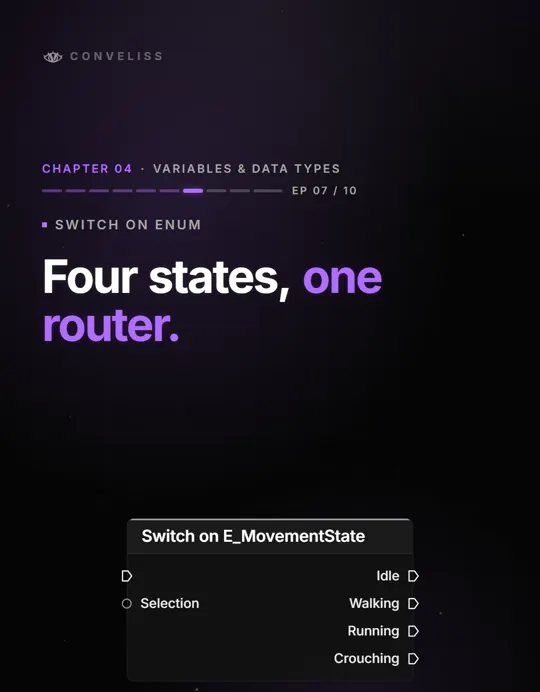
Idle, Walking, Running, Crouching. Four behaviors, and one node routes them all.
- 1:15 video
- Written lesson
- Beginner
Free for everyone from 3 Nov 2026, 00:00 CET
Video coming soon
One exec pin per entry
Chaining Branches with Equal checks gets long fast, and one missing check is easy to miss.
Drag from any enum pin and search for Switch on. The enum goes into Selection, and you get one exec pin per entry.
- When it runs, only the pin matching the current value fires.
- Leave a pin unconnected, and that state simply does nothing.
- There’s no Completed pin: after the chosen path, nothing else runs unless you wire it from that pin.
Switch on Int, String and Name work the same way, plus a Default pin for values you didn’t list.
Example: footstep sounds
Every step, Switch reads Movement State.
- Walking plays a soft step.
- Running plays a heavy one.
- Crouching plays nothing: its pin is left empty on purpose.
Change the state, and the very next step takes another pin.
Remember: Switch picks which code runs. Select picks a value.
Common mistakes
- Adding an enum entry and forgetting the Switches. Add Sliding, and every Switch on that enum gains a new pin. That pin starts unconnected, so sliding is silently ignored.
- After editing an enum, use Find in Blueprints to check every Switch that uses it.
In short
One value in, one path out.
Covered in this lesson
- Switch on Enum
- Switch on Int
- Switch on String
- Switch on Name
- Select
- Find in Blueprints