Chapter 04 Variables & Data Types
#039 Make Struct
Plasma Rifle drops. Sixty damage, twenty rounds. One node packs it all.
- 1:12 video
- Written lesson
- Beginner
Free for everyone from 4 Nov 2026, 00:00 CET
Loose values in, one struct out
Functions and arrays want one struct value, not four loose numbers.
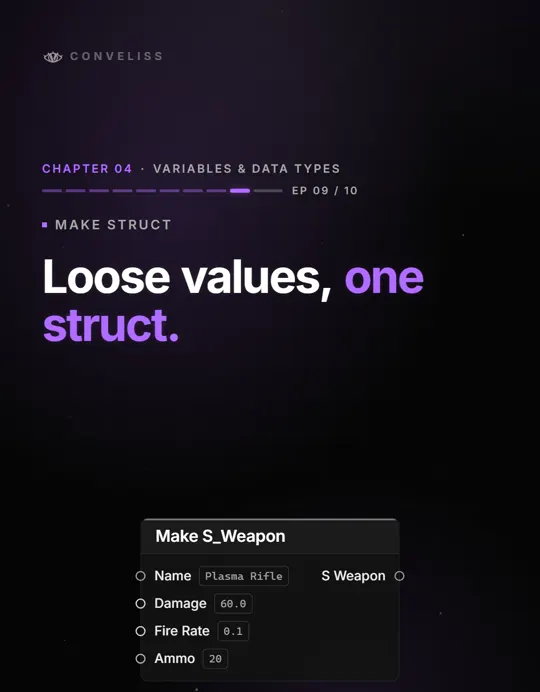
Drag from any struct pin and search for Make, followed by the struct name. You get one input per member, and one output: the finished struct. Type values into the pins, or wire them from other nodes.
Make Vector and Make Transform follow the very same idea.
Struct inputs can also be split: right-click, Split Struct Pin, and fill each member directly.
Example: a weapon pickup
Make S Weapon builds the Plasma Rifle: sixty damage, twenty ammo. Add pushes it into the Weapons array, at index three.
One node, one complete record, ready for your inventory. The same Make also feeds functions that take a whole struct, like Equip Weapon.
Common mistakes
- Using Make just to change one member. Set Weapon from a Make with only Ammo filled, and Name and Damage get overwritten by whatever sits in those pins.
- To change only Ammo, use Set Members in, which keeps every other member.
- Or Break the old value first, and wire every member you want to keep back into the Make.
In short
Loose values in, one struct out.
Covered in this lesson
- Make Struct
- Make Vector
- Make Transform
- Split Struct Pin
- Add
- Set Members in
- Break